What Managed IT Services Covers — and Why It Matters in Houston
What are managed IT services? In simple terms, it’s an arrangement where a specialized IT company — called a managed service provider, or MSP — takes over the ongoing management, monitoring, and support of your business’s technology for a flat monthly fee, instead of you hiring an in-house IT department or calling someone only when something breaks.
If you’re evaluating managed IT services for your Houston business, this guide walks through exactly what that looks like, how it compares to hiring in-house, what it typically costs, and what to look for when you’re choosing a provider.
Key Takeaways
- What are managed IT services? A model where a specialized provider (MSP) proactively manages, monitors, and supports your technology for a flat monthly fee — instead of billing you only when something breaks.
- What’s included typically spans help desk support, network monitoring, cybersecurity, cloud management, and backup/disaster recovery — bundled together, not sold piecemeal.
- In-house, managed, and co-managed IT are three distinct models — the right one depends on your team’s size and existing IT capacity, not just budget.
- Pricing is usually flat-rate per user or device, which most businesses find more predictable than hourly break-fix billing.
- Houston businesses face specific risks — hurricane season chief among them — that make proactive IT management more of a necessity than a luxury here.
- Choosing a provider comes down to response-time guarantees, security posture, and verifiable references — not just price.
What Managed IT Services Actually Means
At its core, managed IT services mean outsourcing responsibility for your technology’s health to a third party that specializes in it. Rather than billing you by the hour when something goes wrong, an MSP charges a predictable monthly rate to keep things from going wrong in the first place — monitoring your network around the clock, patching software before vulnerabilities get exploited, and handling day-to-day support requests from your team.
We’ve written before about what’s typically included in managed IT services, but the short version is this: it’s proactive by design. A good MSP knows about a failing hard drive or a suspicious login attempt before you do, because they’re watching for it continuously — not waiting for a support ticket.
This is also why the model has grown so fast. Small and mid-sized businesses get access to the same level of IT oversight that used to require a full internal department, without the cost of hiring, training, and retaining that staff themselves.
What’s Typically Included
Managed IT services aren’t one single service — they’re a bundle of capabilities that work together. Here’s what that usually covers:
Help Desk & IT Support
Your team needs somewhere to turn when a laptop won’t connect, an app crashes, or a password gets locked. Managed IT help desk support gives employees a direct line to real technicians, typically with guaranteed response times built into the agreement — a meaningful upgrade from “email the one person in the office who’s good with computers.”
Network & Infrastructure Monitoring
MSPs continuously monitor servers, firewalls, Wi-Fi, and connected devices for early warning signs of failure or attack. This is the proactive layer that catches problems while they’re still small — see our breakdown of IT infrastructure management and monitoring for more detail on how this actually works day to day.
Cybersecurity
Security isn’t an add-on anymore — it’s a baseline expectation. The Cybersecurity and Infrastructure Security Agency (CISA) lists multi-factor authentication and regular software patching among its core cybersecurity essentials for small businesses — both standard components of a managed cybersecurity and phishing training program.
Cloud Services
Most MSP agreements now include managing and optimizing whatever mix of cloud tools your business runs on — email, file storage, line-of-business applications. If you’re still weighing whether to move more of your operations to the cloud, types of cloud computing services and their benefits is a good primer, and our cloud hosting services page covers what a managed cloud environment looks like in practice.
Backup & Disaster Recovery
Nothing on this list matters if a single failure — a ransomware attack, a fire, a flood — can wipe out your data permanently. Data backup and disaster recovery is a standard part of most managed IT agreements, and we’d argue it’s the single most important one. More on why in the Houston-specific section below.
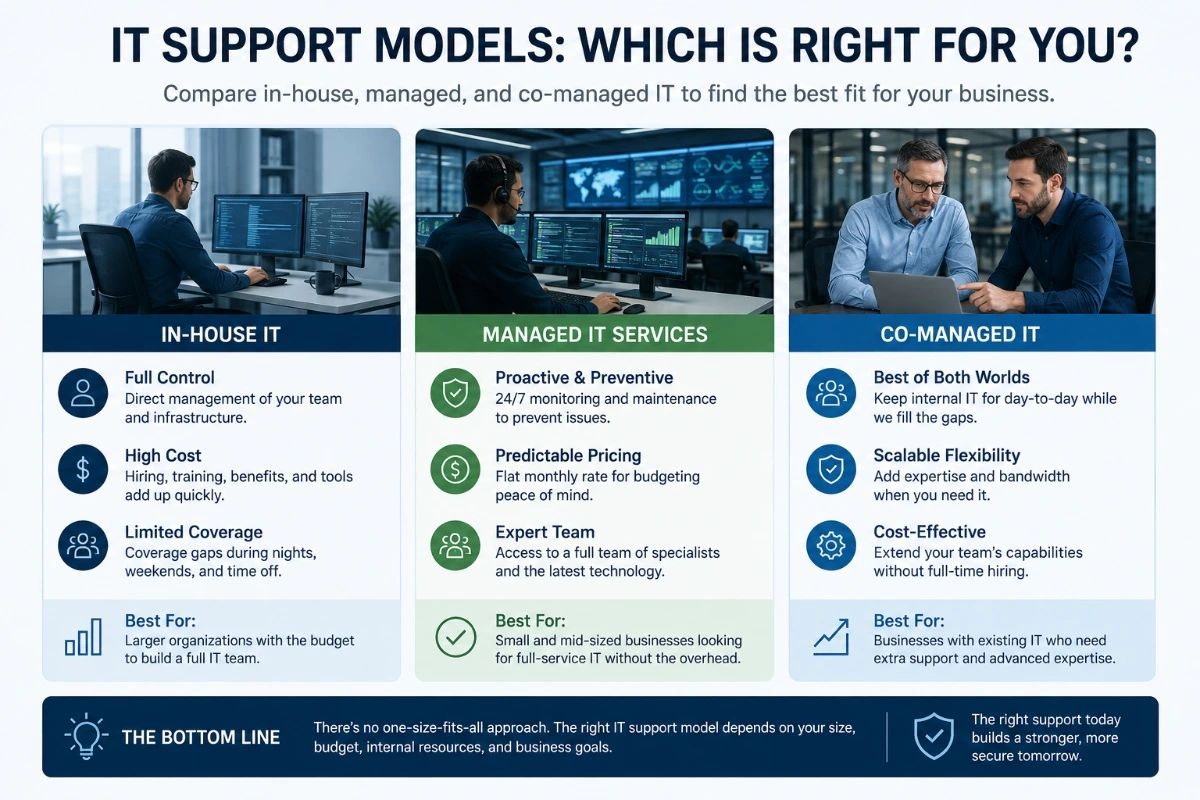
In-House vs. Managed vs. Co-Managed IT
There are really three models businesses choose between:
In-house IT means hiring your own staff. It gives you direct control, but one or two employees can’t realistically cover help desk support, security monitoring, infrastructure management, and strategic planning all at once — and you’re exposed any time that person is out sick, on vacation, or leaves the company.
Fully managed IT means outsourcing the whole function to an MSP. You get a full team’s worth of coverage — help desk, security, monitoring, strategy — without the overhead of hiring one.
Co-managed IT sits in between: your internal IT person handles the day-to-day and institutional knowledge, while an MSP fills the gaps — after-hours monitoring, specialized security work, or extra hands during a big project. We wrote a deeper explanation of co-managed IT services as an approach to networking if that model sounds like a better fit than an all-or-nothing choice.
For a lot of growing businesses, the right answer isn’t obvious at first — our post on the sweet spot between managed IT and in-house support walks through how to figure out which side of that line your business actually falls on.
What Managed IT Services Cost
Pricing varies by provider and scope, but most MSPs bill in one of two ways: flat-rate (a fixed monthly fee per user or per device, covering an agreed scope of services) or hourly/ad hoc (billed only when work is performed). We’ve made our case before for why flat-rate IT support beats hourly IT support for most businesses — predictable budgeting matters, and hourly billing has a way of penalizing you most when something’s already gone wrong.
Whatever pricing model a provider uses, cost shouldn’t be the only variable you’re comparing. Our guide on how to avoid paying too much for an MSP covers the red flags — vague scopes, hidden fees, and “too good to be true” quotes — worth reading before you sign anything.
How to Choose the Right MSP
A few things worth checking before committing to a provider:
- Response time guarantees. Get specifics in writing, not “we’re usually pretty fast.”
- Security posture. Ask what they do proactively, not just what they’ll do after an incident.
- References from similar-sized businesses. Not just testimonials — actual conversations.
- Clear, itemized scope. If you can’t tell what’s included from the contract, that’s a problem later.
- Local presence and response. Remote monitoring is standard, but when something needs a technician on-site, distance matters.
There’s a lot of noise in this industry, and not all of it is honest — we debunked some of the more persistent ones in 4 myths about managed service providers, busted.
Why This Matters More in Houston
Houston businesses deal with a few things that make managed IT services less optional than in a lot of other markets. Hurricane season alone is reason enough — the Atlantic hurricane season officially runs June 1 through November 30 per NOAA, and a single storm can mean days of power outages, flooding, or displaced staff. Businesses without a real backup and disaster recovery plan often don’t come back the same. Our hurricane season data backup and recovery tips are worth bookmarking regardless of who handles your IT.
Beyond weather, the Houston market has its own quirks when it comes to finding reliable local support — we covered some of the more common ones in navigating IT support in Houston: common challenges and innovative solutions.
Frequently Asked Questions
Getting Started
How are managed IT services different from just calling someone when something breaks?
Traditional “break-fix” IT is reactive — you pay when there’s a problem. Managed IT services are proactive: monitoring, maintenance, and security run continuously, so fewer problems happen in the first place.
Are managed IT services only for large companies?
No — it’s actually most valuable for small and mid-sized businesses that can’t justify a full in-house IT department but still need enterprise-level protection and support.
How quickly can a business switch to a managed IT provider?
Most transitions take a few weeks, starting with an assessment of your current environment before onboarding begins.
Do I need to replace my current hardware to get started?
Usually not. Most MSPs work with your existing setup first, then recommend upgrades only where they’re genuinely needed.
What happens to my current IT person if I bring in an MSP?
Many businesses keep their internal IT staff and move to a co-managed model, where the MSP supplements rather than replaces them.
What’s Included
Do managed IT services include cybersecurity?
Yes, in virtually all modern agreements — it’s considered a baseline component, not an add-on.
Are software licenses included in managed IT services?
Sometimes, depending on the provider and plan. Always confirm exactly what’s bundled versus billed separately before signing.
Do managed IT services cover cloud services like Microsoft 365 or Google Workspace?
Typically, yes — most MSPs manage, secure, and optimize whatever cloud platforms your business already uses.
What’s the difference between managed IT and managed security services?
Managed IT is the broader umbrella; managed security is a specialized subset focused specifically on threat prevention, detection, and response.
Will an MSP handle new employee IT setup?
Yes — onboarding and offboarding IT access is a standard part of most managed IT agreements.
Cost & Contracts
How much do managed IT services typically cost?
Pricing varies widely based on company size, scope of services, and provider — flat-rate plans are usually billed per user or per device monthly.
Are there hidden fees I should watch for?
Yes — ask specifically about after-hours support, on-site visits, and project work, since these are common places providers add unlisted charges.
Is a long-term contract required? It depends on the provider.
Some require annual agreements; others offer month-to-month terms.
Can I switch providers if I’m unhappy with the service?
Yes, though most contracts include a notice period. Review termination terms before signing.
Do managed IT services save money compared to in-house IT?
For most small and mid-sized businesses, yes — you get broader coverage without the overhead of full-time salaries, benefits, and training.
Choosing a Provider
What questions should I ask a potential MSP before signing?
Ask about response-time guarantees, what’s included versus what’s billed separately, their security approach, and references from similar-sized clients.
Should I choose a local Houston provider or a national company?
Local providers typically offer faster on-site response and a better understanding of regional risks like hurricane season.
How do I know if an MSP is actually good, not just good at sales?
Ask for references you can actually call, not just written testimonials, and ask specifically what they do proactively versus reactively.
What’s a red flag when evaluating an MSP?
Vague scopes of work, reluctance to guarantee response times, and pricing that seems too low for the services promised.
Can a business start with a smaller scope and expand later?
Most reputable MSPs offer tiered plans, so yes — you can typically start with core services and add on as needs grow.
Final Thoughts
Managed IT services isn’t just outsourced tech support — it’s a shift from reacting to problems to preventing them, with a predictable monthly cost instead of surprise bills when something breaks. For Houston businesses in particular, the added risks of severe weather and a competitive local market make proactive IT management less of a luxury and more of a basic operating requirement.
If you’re ready to see what that looks like for your business specifically, our managed IT services page breaks down our plans, or you can contact us directly to talk through what your business actually needs.